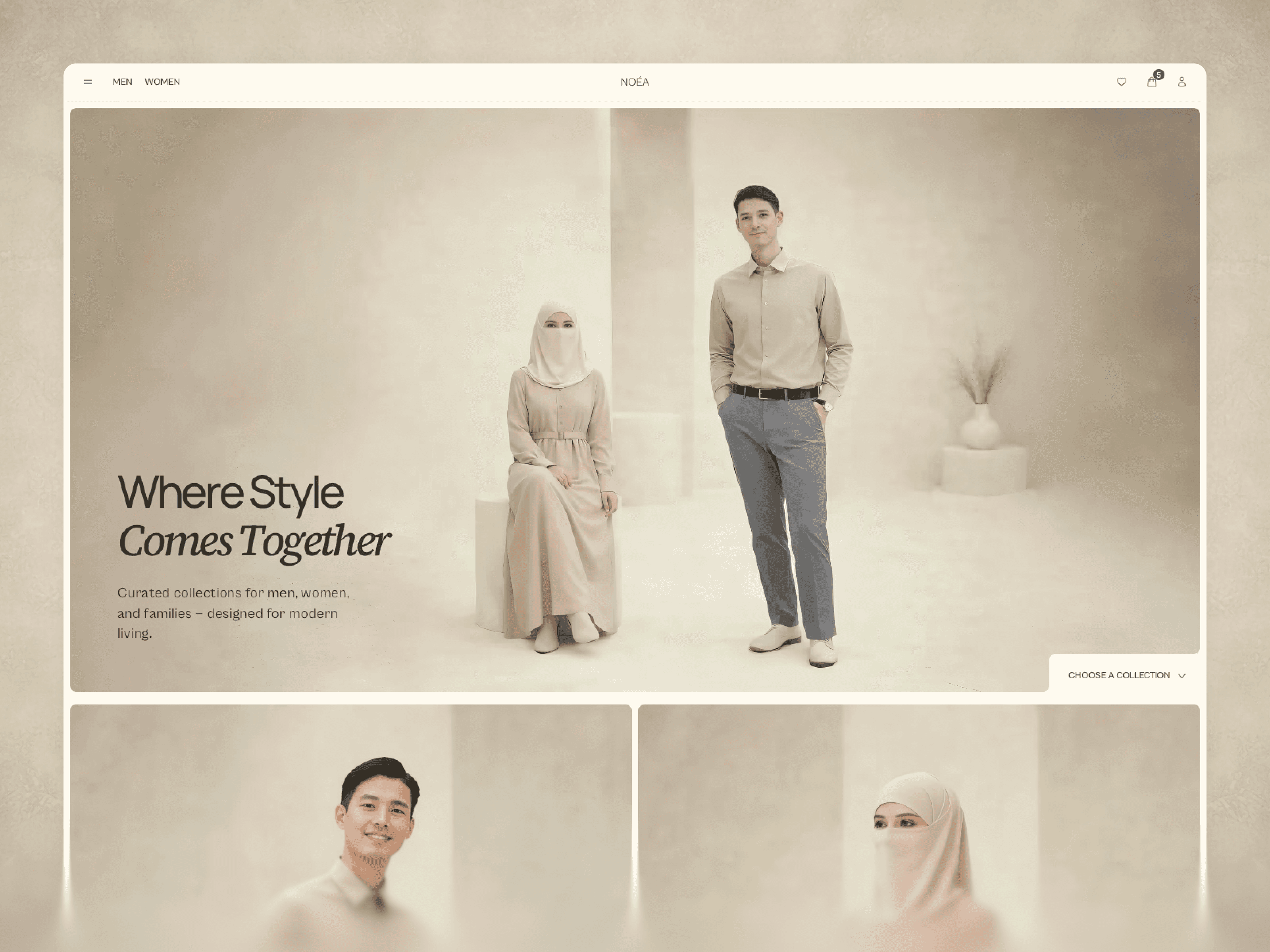
Overview
Documentation & Setup Guide
Noéa
Documentation & Setup Guide
This guide helps you set up, customize, and launch Noéa efficiently.
1. Getting Started
After purchase, you’ll receive access to the Framer Remix link.
Steps:
Open the Remix link
Duplicate the project into your Framer workspace
Publish to your own domain or Framer subdomain
You now fully own and control the project.
2. Project Structure Overview
Noéa is organized into three main systems:
Pages → User-facing journeys
CMS Collections → Dynamic content
Components → Reusable UI & logic
Avoid restructuring unless necessary.
3. CMS Setup (Required)
Products Collection
Used for all ecommerce items.
You’ll manage:
Title
Price (current & original)
Images (per color)
Sizes & availability
Materials, fit, care
Tags (for recommendations)
All product pages are generated dynamically.
Look Book Collection
Used for editorial outfits and family edits.
Each Look Book:
References real products
Pulls products dynamically
Supports editorial storytelling
This allows scalable content without duplication.
Look Book Guide Collection
Used for blog-style styling content.
Best for:
Styling advice
Editorial guidance
Internal product linking
4. Editing Content
Text & Copy
All text is editable directly on canvas or via CMS
No hardcoded content
Images
Replace demo images with your brand visuals
Maintain aspect ratios for consistency
Aspect Ratio 1:1 is perfect but can be used portrait visuals
Colors & Typography
Global styles are defined once
Light & Dark mode supported
Avoid adding unnecessary styles to keep premium consistency
I currently used only 12 Colors for each mode (i.e. Light)
5. Navigation & Flow
The navigation is intentionally minimal.
Do not overload menus with:
Extra categories
Filters
Promotional links
The system is designed to guide decisions, not explore endlessly.
6. Ecommerce & Payments
Noéa does not lock you into a payment provider.
Recommended options:
Lemon Squeezy
External Stripe flow
Custom checkout logic
You are responsible for:
Payment setup
Taxes & compliance
Delivery method (digital / physical)
Promo Code
7. Manual Checkout Setup (Important)
Manual setup is required by design.
You can configure checkout to support:
Guest checkout
Signed-in users
Or both — depending on your business needs
This approach keeps the storefront flexible, provider-agnostic, and compliant with different selling models.
Once connected, the shopping flow remains smooth and uninterrupted.
8. Product Page Behavior (PDP)
Key UX elements already configured:
Clear price hierarchy
Trust micro-signals near CTA
Accordion-based details
Sticky product details bar (Bottom)
You can customize:
CTA labels
Trust messages
Accordion content
9. No Third-Party Integrations Used
Noéa does not rely on any third-party plugins or external UI libraries.
That means:
No locked systems
No dependency risks
No performance overhead
No surprise breaking changes
Everything you see is built using native Framer capabilities and custom codes components & code overrides where required.
10. What You Should Customize
Must do:
Replace demo products
Add your brand copy
Connect payment provider
Update legal pages
Optional:
Adjust animations
Add analytics (GA, Plausible, etc.)
Customize dark mode colors
11. What You Should NOT Change (Recommended)
CMS relationships
Product → Look Book linking logic
Core navigation structure
PDP hierarchy
Changing these may reduce conversion effectiveness.
12. Updates & Maintenance
Keep a clean duplicate before major changes
Test CMS changes on preview before publishing
Regularly review mobile experience
13. My Support & Custom Work
Noéa is fully editable.
However, if you need direct assistance or advanced customization, you’re welcome to reach out.
I’m available for:
Brand adaptation & visual alignment
Custom ecommerce logic
Performance optimization
Advanced CMS workflows
Other Framer-related refinements
My Working Restrictions
I work strictly within ethical and value-conscious boundaries.
I do not accept projects involving:
Sexualized or immodest content
Deceptive or manipulative UX practices
Dishonest marketing or misleading flows
Anything that conflicts with Islamic principles
I believe good design should be honest, respectful, and purposeful — not exploitative.
If your project aligns with these values, I’ll be happy to collaborate.
Noéa is designed to stay quiet in the background. so your products stay in focus.
Set it up once. Scale with confidence.
Overview
Documentation & Setup Guide
Noéa
Documentation & Setup Guide
This guide helps you set up, customize, and launch Noéa efficiently.
1. Getting Started
After purchase, you’ll receive access to the Framer Remix link.
Steps:
Open the Remix link
Duplicate the project into your Framer workspace
Publish to your own domain or Framer subdomain
You now fully own and control the project.
2. Project Structure Overview
Noéa is organized into three main systems:
Pages → User-facing journeys
CMS Collections → Dynamic content
Components → Reusable UI & logic
Avoid restructuring unless necessary.
3. CMS Setup (Required)
Products Collection
Used for all ecommerce items.
You’ll manage:
Title
Price (current & original)
Images (per color)
Sizes & availability
Materials, fit, care
Tags (for recommendations)
All product pages are generated dynamically.
Look Book Collection
Used for editorial outfits and family edits.
Each Look Book:
References real products
Pulls products dynamically
Supports editorial storytelling
This allows scalable content without duplication.
Look Book Guide Collection
Used for blog-style styling content.
Best for:
Styling advice
Editorial guidance
Internal product linking
4. Editing Content
Text & Copy
All text is editable directly on canvas or via CMS
No hardcoded content
Images
Replace demo images with your brand visuals
Maintain aspect ratios for consistency
Aspect Ratio 1:1 is perfect but can be used portrait visuals
Colors & Typography
Global styles are defined once
Light & Dark mode supported
Avoid adding unnecessary styles to keep premium consistency
I currently used only 12 Colors for each mode (i.e. Light)
5. Navigation & Flow
The navigation is intentionally minimal.
Do not overload menus with:
Extra categories
Filters
Promotional links
The system is designed to guide decisions, not explore endlessly.
6. Ecommerce & Payments
Noéa does not lock you into a payment provider.
Recommended options:
Lemon Squeezy
External Stripe flow
Custom checkout logic
You are responsible for:
Payment setup
Taxes & compliance
Delivery method (digital / physical)
Promo Code
7. Manual Checkout Setup (Important)
Manual setup is required by design.
You can configure checkout to support:
Guest checkout
Signed-in users
Or both — depending on your business needs
This approach keeps the storefront flexible, provider-agnostic, and compliant with different selling models.
Once connected, the shopping flow remains smooth and uninterrupted.
8. Product Page Behavior (PDP)
Key UX elements already configured:
Clear price hierarchy
Trust micro-signals near CTA
Accordion-based details
Sticky product details bar (Bottom)
You can customize:
CTA labels
Trust messages
Accordion content
9. No Third-Party Integrations Used
Noéa does not rely on any third-party plugins or external UI libraries.
That means:
No locked systems
No dependency risks
No performance overhead
No surprise breaking changes
Everything you see is built using native Framer capabilities and custom codes components & code overrides where required.
10. What You Should Customize
Must do:
Replace demo products
Add your brand copy
Connect payment provider
Update legal pages
Optional:
Adjust animations
Add analytics (GA, Plausible, etc.)
Customize dark mode colors
11. What You Should NOT Change (Recommended)
CMS relationships
Product → Look Book linking logic
Core navigation structure
PDP hierarchy
Changing these may reduce conversion effectiveness.
12. Updates & Maintenance
Keep a clean duplicate before major changes
Test CMS changes on preview before publishing
Regularly review mobile experience
13. My Support & Custom Work
Noéa is fully editable.
However, if you need direct assistance or advanced customization, you’re welcome to reach out.
I’m available for:
Brand adaptation & visual alignment
Custom ecommerce logic
Performance optimization
Advanced CMS workflows
Other Framer-related refinements
My Working Restrictions
I work strictly within ethical and value-conscious boundaries.
I do not accept projects involving:
Sexualized or immodest content
Deceptive or manipulative UX practices
Dishonest marketing or misleading flows
Anything that conflicts with Islamic principles
I believe good design should be honest, respectful, and purposeful — not exploitative.
If your project aligns with these values, I’ll be happy to collaborate.
Noéa is designed to stay quiet in the background. so your products stay in focus.
Set it up once. Scale with confidence.
Overview
Documentation & Setup Guide
Noéa
Documentation & Setup Guide
This guide helps you set up, customize, and launch Noéa efficiently.
1. Getting Started
After purchase, you’ll receive access to the Framer Remix link.
Steps:
Open the Remix link
Duplicate the project into your Framer workspace
Publish to your own domain or Framer subdomain
You now fully own and control the project.
2. Project Structure Overview
Noéa is organized into three main systems:
Pages → User-facing journeys
CMS Collections → Dynamic content
Components → Reusable UI & logic
Avoid restructuring unless necessary.
3. CMS Setup (Required)
Products Collection
Used for all ecommerce items.
You’ll manage:
Title
Price (current & original)
Images (per color)
Sizes & availability
Materials, fit, care
Tags (for recommendations)
All product pages are generated dynamically.
Look Book Collection
Used for editorial outfits and family edits.
Each Look Book:
References real products
Pulls products dynamically
Supports editorial storytelling
This allows scalable content without duplication.
Look Book Guide Collection
Used for blog-style styling content.
Best for:
Styling advice
Editorial guidance
Internal product linking
4. Editing Content
Text & Copy
All text is editable directly on canvas or via CMS
No hardcoded content
Images
Replace demo images with your brand visuals
Maintain aspect ratios for consistency
Aspect Ratio 1:1 is perfect but can be used portrait visuals
Colors & Typography
Global styles are defined once
Light & Dark mode supported
Avoid adding unnecessary styles to keep premium consistency
I currently used only 12 Colors for each mode (i.e. Light)
5. Navigation & Flow
The navigation is intentionally minimal.
Do not overload menus with:
Extra categories
Filters
Promotional links
The system is designed to guide decisions, not explore endlessly.
6. Ecommerce & Payments
Noéa does not lock you into a payment provider.
Recommended options:
Lemon Squeezy
External Stripe flow
Custom checkout logic
You are responsible for:
Payment setup
Taxes & compliance
Delivery method (digital / physical)
Promo Code
7. Manual Checkout Setup (Important)
Manual setup is required by design.
You can configure checkout to support:
Guest checkout
Signed-in users
Or both — depending on your business needs
This approach keeps the storefront flexible, provider-agnostic, and compliant with different selling models.
Once connected, the shopping flow remains smooth and uninterrupted.
8. Product Page Behavior (PDP)
Key UX elements already configured:
Clear price hierarchy
Trust micro-signals near CTA
Accordion-based details
Sticky product details bar (Bottom)
You can customize:
CTA labels
Trust messages
Accordion content
9. No Third-Party Integrations Used
Noéa does not rely on any third-party plugins or external UI libraries.
That means:
No locked systems
No dependency risks
No performance overhead
No surprise breaking changes
Everything you see is built using native Framer capabilities and custom codes components & code overrides where required.
10. What You Should Customize
Must do:
Replace demo products
Add your brand copy
Connect payment provider
Update legal pages
Optional:
Adjust animations
Add analytics (GA, Plausible, etc.)
Customize dark mode colors
11. What You Should NOT Change (Recommended)
CMS relationships
Product → Look Book linking logic
Core navigation structure
PDP hierarchy
Changing these may reduce conversion effectiveness.
12. Updates & Maintenance
Keep a clean duplicate before major changes
Test CMS changes on preview before publishing
Regularly review mobile experience
13. My Support & Custom Work
Noéa is fully editable.
However, if you need direct assistance or advanced customization, you’re welcome to reach out.
I’m available for:
Brand adaptation & visual alignment
Custom ecommerce logic
Performance optimization
Advanced CMS workflows
Other Framer-related refinements
My Working Restrictions
I work strictly within ethical and value-conscious boundaries.
I do not accept projects involving:
Sexualized or immodest content
Deceptive or manipulative UX practices
Dishonest marketing or misleading flows
Anything that conflicts with Islamic principles
I believe good design should be honest, respectful, and purposeful — not exploitative.
If your project aligns with these values, I’ll be happy to collaborate.
Noéa is designed to stay quiet in the background. so your products stay in focus.
Set it up once. Scale with confidence.
Overview
Documentation & Setup Guide
Noéa
Documentation & Setup Guide
This guide helps you set up, customize, and launch Noéa efficiently.
1. Getting Started
After purchase, you’ll receive access to the Framer Remix link.
Steps:
Open the Remix link
Duplicate the project into your Framer workspace
Publish to your own domain or Framer subdomain
You now fully own and control the project.
2. Project Structure Overview
Noéa is organized into three main systems:
Pages → User-facing journeys
CMS Collections → Dynamic content
Components → Reusable UI & logic
Avoid restructuring unless necessary.
3. CMS Setup (Required)
Products Collection
Used for all ecommerce items.
You’ll manage:
Title
Price (current & original)
Images (per color)
Sizes & availability
Materials, fit, care
Tags (for recommendations)
All product pages are generated dynamically.
Look Book Collection
Used for editorial outfits and family edits.
Each Look Book:
References real products
Pulls products dynamically
Supports editorial storytelling
This allows scalable content without duplication.
Look Book Guide Collection
Used for blog-style styling content.
Best for:
Styling advice
Editorial guidance
Internal product linking
4. Editing Content
Text & Copy
All text is editable directly on canvas or via CMS
No hardcoded content
Images
Replace demo images with your brand visuals
Maintain aspect ratios for consistency
Aspect Ratio 1:1 is perfect but can be used portrait visuals
Colors & Typography
Global styles are defined once
Light & Dark mode supported
Avoid adding unnecessary styles to keep premium consistency
I currently used only 12 Colors for each mode (i.e. Light)
5. Navigation & Flow
The navigation is intentionally minimal.
Do not overload menus with:
Extra categories
Filters
Promotional links
The system is designed to guide decisions, not explore endlessly.
6. Ecommerce & Payments
Noéa does not lock you into a payment provider.
Recommended options:
Lemon Squeezy
External Stripe flow
Custom checkout logic
You are responsible for:
Payment setup
Taxes & compliance
Delivery method (digital / physical)
Promo Code
7. Manual Checkout Setup (Important)
Manual setup is required by design.
You can configure checkout to support:
Guest checkout
Signed-in users
Or both — depending on your business needs
This approach keeps the storefront flexible, provider-agnostic, and compliant with different selling models.
Once connected, the shopping flow remains smooth and uninterrupted.
8. Product Page Behavior (PDP)
Key UX elements already configured:
Clear price hierarchy
Trust micro-signals near CTA
Accordion-based details
Sticky product details bar (Bottom)
You can customize:
CTA labels
Trust messages
Accordion content
9. No Third-Party Integrations Used
Noéa does not rely on any third-party plugins or external UI libraries.
That means:
No locked systems
No dependency risks
No performance overhead
No surprise breaking changes
Everything you see is built using native Framer capabilities and custom codes components & code overrides where required.
10. What You Should Customize
Must do:
Replace demo products
Add your brand copy
Connect payment provider
Update legal pages
Optional:
Adjust animations
Add analytics (GA, Plausible, etc.)
Customize dark mode colors
11. What You Should NOT Change (Recommended)
CMS relationships
Product → Look Book linking logic
Core navigation structure
PDP hierarchy
Changing these may reduce conversion effectiveness.
12. Updates & Maintenance
Keep a clean duplicate before major changes
Test CMS changes on preview before publishing
Regularly review mobile experience
13. My Support & Custom Work
Noéa is fully editable.
However, if you need direct assistance or advanced customization, you’re welcome to reach out.
I’m available for:
Brand adaptation & visual alignment
Custom ecommerce logic
Performance optimization
Advanced CMS workflows
Other Framer-related refinements
My Working Restrictions
I work strictly within ethical and value-conscious boundaries.
I do not accept projects involving:
Sexualized or immodest content
Deceptive or manipulative UX practices
Dishonest marketing or misleading flows
Anything that conflicts with Islamic principles
I believe good design should be honest, respectful, and purposeful — not exploitative.
If your project aligns with these values, I’ll be happy to collaborate.
Noéa is designed to stay quiet in the background. so your products stay in focus.
Set it up once. Scale with confidence.
Overview
Documentation & Setup Guide
Noéa
Documentation & Setup Guide
This guide helps you set up, customize, and launch Noéa efficiently.
1. Getting Started
After purchase, you’ll receive access to the Framer Remix link.
Steps:
Open the Remix link
Duplicate the project into your Framer workspace
Publish to your own domain or Framer subdomain
You now fully own and control the project.
2. Project Structure Overview
Noéa is organized into three main systems:
Pages → User-facing journeys
CMS Collections → Dynamic content
Components → Reusable UI & logic
Avoid restructuring unless necessary.
3. CMS Setup (Required)
Products Collection
Used for all ecommerce items.
You’ll manage:
Title
Price (current & original)
Images (per color)
Sizes & availability
Materials, fit, care
Tags (for recommendations)
All product pages are generated dynamically.
Look Book Collection
Used for editorial outfits and family edits.
Each Look Book:
References real products
Pulls products dynamically
Supports editorial storytelling
This allows scalable content without duplication.
Look Book Guide Collection
Used for blog-style styling content.
Best for:
Styling advice
Editorial guidance
Internal product linking
4. Editing Content
Text & Copy
All text is editable directly on canvas or via CMS
No hardcoded content
Images
Replace demo images with your brand visuals
Maintain aspect ratios for consistency
Aspect Ratio 1:1 is perfect but can be used portrait visuals
Colors & Typography
Global styles are defined once
Light & Dark mode supported
Avoid adding unnecessary styles to keep premium consistency
I currently used only 12 Colors for each mode (i.e. Light)
5. Navigation & Flow
The navigation is intentionally minimal.
Do not overload menus with:
Extra categories
Filters
Promotional links
The system is designed to guide decisions, not explore endlessly.
6. Ecommerce & Payments
Noéa does not lock you into a payment provider.
Recommended options:
Lemon Squeezy
External Stripe flow
Custom checkout logic
You are responsible for:
Payment setup
Taxes & compliance
Delivery method (digital / physical)
Promo Code
7. Manual Checkout Setup (Important)
Manual setup is required by design.
You can configure checkout to support:
Guest checkout
Signed-in users
Or both — depending on your business needs
This approach keeps the storefront flexible, provider-agnostic, and compliant with different selling models.
Once connected, the shopping flow remains smooth and uninterrupted.
8. Product Page Behavior (PDP)
Key UX elements already configured:
Clear price hierarchy
Trust micro-signals near CTA
Accordion-based details
Sticky product details bar (Bottom)
You can customize:
CTA labels
Trust messages
Accordion content
9. No Third-Party Integrations Used
Noéa does not rely on any third-party plugins or external UI libraries.
That means:
No locked systems
No dependency risks
No performance overhead
No surprise breaking changes
Everything you see is built using native Framer capabilities and custom codes components & code overrides where required.
10. What You Should Customize
Must do:
Replace demo products
Add your brand copy
Connect payment provider
Update legal pages
Optional:
Adjust animations
Add analytics (GA, Plausible, etc.)
Customize dark mode colors
11. What You Should NOT Change (Recommended)
CMS relationships
Product → Look Book linking logic
Core navigation structure
PDP hierarchy
Changing these may reduce conversion effectiveness.
12. Updates & Maintenance
Keep a clean duplicate before major changes
Test CMS changes on preview before publishing
Regularly review mobile experience
13. My Support & Custom Work
Noéa is fully editable.
However, if you need direct assistance or advanced customization, you’re welcome to reach out.
I’m available for:
Brand adaptation & visual alignment
Custom ecommerce logic
Performance optimization
Advanced CMS workflows
Other Framer-related refinements
My Working Restrictions
I work strictly within ethical and value-conscious boundaries.
I do not accept projects involving:
Sexualized or immodest content
Deceptive or manipulative UX practices
Dishonest marketing or misleading flows
Anything that conflicts with Islamic principles
I believe good design should be honest, respectful, and purposeful — not exploitative.
If your project aligns with these values, I’ll be happy to collaborate.
Noéa is designed to stay quiet in the background. so your products stay in focus.
Set it up once. Scale with confidence.
Overview
Documentation & Setup Guide
Noéa
Documentation & Setup Guide
This guide helps you set up, customize, and launch Noéa efficiently.
1. Getting Started
After purchase, you’ll receive access to the Framer Remix link.
Steps:
Open the Remix link
Duplicate the project into your Framer workspace
Publish to your own domain or Framer subdomain
You now fully own and control the project.
2. Project Structure Overview
Noéa is organized into three main systems:
Pages → User-facing journeys
CMS Collections → Dynamic content
Components → Reusable UI & logic
Avoid restructuring unless necessary.
3. CMS Setup (Required)
Products Collection
Used for all ecommerce items.
You’ll manage:
Title
Price (current & original)
Images (per color)
Sizes & availability
Materials, fit, care
Tags (for recommendations)
All product pages are generated dynamically.
Look Book Collection
Used for editorial outfits and family edits.
Each Look Book:
References real products
Pulls products dynamically
Supports editorial storytelling
This allows scalable content without duplication.
Look Book Guide Collection
Used for blog-style styling content.
Best for:
Styling advice
Editorial guidance
Internal product linking
4. Editing Content
Text & Copy
All text is editable directly on canvas or via CMS
No hardcoded content
Images
Replace demo images with your brand visuals
Maintain aspect ratios for consistency
Aspect Ratio 1:1 is perfect but can be used portrait visuals
Colors & Typography
Global styles are defined once
Light & Dark mode supported
Avoid adding unnecessary styles to keep premium consistency
I currently used only 12 Colors for each mode (i.e. Light)
5. Navigation & Flow
The navigation is intentionally minimal.
Do not overload menus with:
Extra categories
Filters
Promotional links
The system is designed to guide decisions, not explore endlessly.
6. Ecommerce & Payments
Noéa does not lock you into a payment provider.
Recommended options:
Lemon Squeezy
External Stripe flow
Custom checkout logic
You are responsible for:
Payment setup
Taxes & compliance
Delivery method (digital / physical)
Promo Code
7. Manual Checkout Setup (Important)
Manual setup is required by design.
You can configure checkout to support:
Guest checkout
Signed-in users
Or both — depending on your business needs
This approach keeps the storefront flexible, provider-agnostic, and compliant with different selling models.
Once connected, the shopping flow remains smooth and uninterrupted.
8. Product Page Behavior (PDP)
Key UX elements already configured:
Clear price hierarchy
Trust micro-signals near CTA
Accordion-based details
Sticky product details bar (Bottom)
You can customize:
CTA labels
Trust messages
Accordion content
9. No Third-Party Integrations Used
Noéa does not rely on any third-party plugins or external UI libraries.
That means:
No locked systems
No dependency risks
No performance overhead
No surprise breaking changes
Everything you see is built using native Framer capabilities and custom codes components & code overrides where required.
10. What You Should Customize
Must do:
Replace demo products
Add your brand copy
Connect payment provider
Update legal pages
Optional:
Adjust animations
Add analytics (GA, Plausible, etc.)
Customize dark mode colors
11. What You Should NOT Change (Recommended)
CMS relationships
Product → Look Book linking logic
Core navigation structure
PDP hierarchy
Changing these may reduce conversion effectiveness.
12. Updates & Maintenance
Keep a clean duplicate before major changes
Test CMS changes on preview before publishing
Regularly review mobile experience
13. My Support & Custom Work
Noéa is fully editable.
However, if you need direct assistance or advanced customization, you’re welcome to reach out.
I’m available for:
Brand adaptation & visual alignment
Custom ecommerce logic
Performance optimization
Advanced CMS workflows
Other Framer-related refinements
My Working Restrictions
I work strictly within ethical and value-conscious boundaries.
I do not accept projects involving:
Sexualized or immodest content
Deceptive or manipulative UX practices
Dishonest marketing or misleading flows
Anything that conflicts with Islamic principles
I believe good design should be honest, respectful, and purposeful — not exploitative.
If your project aligns with these values, I’ll be happy to collaborate.
Noéa is designed to stay quiet in the background. so your products stay in focus.
Set it up once. Scale with confidence.
Overview
Documentation & Setup Guide
Noéa
Documentation & Setup Guide
This guide helps you set up, customize, and launch Noéa efficiently.
1. Getting Started
After purchase, you’ll receive access to the Framer Remix link.
Steps:
Open the Remix link
Duplicate the project into your Framer workspace
Publish to your own domain or Framer subdomain
You now fully own and control the project.
2. Project Structure Overview
Noéa is organized into three main systems:
Pages → User-facing journeys
CMS Collections → Dynamic content
Components → Reusable UI & logic
Avoid restructuring unless necessary.
3. CMS Setup (Required)
Products Collection
Used for all ecommerce items.
You’ll manage:
Title
Price (current & original)
Images (per color)
Sizes & availability
Materials, fit, care
Tags (for recommendations)
All product pages are generated dynamically.
Look Book Collection
Used for editorial outfits and family edits.
Each Look Book:
References real products
Pulls products dynamically
Supports editorial storytelling
This allows scalable content without duplication.
Look Book Guide Collection
Used for blog-style styling content.
Best for:
Styling advice
Editorial guidance
Internal product linking
4. Editing Content
Text & Copy
All text is editable directly on canvas or via CMS
No hardcoded content
Images
Replace demo images with your brand visuals
Maintain aspect ratios for consistency
Aspect Ratio 1:1 is perfect but can be used portrait visuals
Colors & Typography
Global styles are defined once
Light & Dark mode supported
Avoid adding unnecessary styles to keep premium consistency
I currently used only 12 Colors for each mode (i.e. Light)
5. Navigation & Flow
The navigation is intentionally minimal.
Do not overload menus with:
Extra categories
Filters
Promotional links
The system is designed to guide decisions, not explore endlessly.
6. Ecommerce & Payments
Noéa does not lock you into a payment provider.
Recommended options:
Lemon Squeezy
External Stripe flow
Custom checkout logic
You are responsible for:
Payment setup
Taxes & compliance
Delivery method (digital / physical)
Promo Code
7. Manual Checkout Setup (Important)
Manual setup is required by design.
You can configure checkout to support:
Guest checkout
Signed-in users
Or both — depending on your business needs
This approach keeps the storefront flexible, provider-agnostic, and compliant with different selling models.
Once connected, the shopping flow remains smooth and uninterrupted.
8. Product Page Behavior (PDP)
Key UX elements already configured:
Clear price hierarchy
Trust micro-signals near CTA
Accordion-based details
Sticky product details bar (Bottom)
You can customize:
CTA labels
Trust messages
Accordion content
9. No Third-Party Integrations Used
Noéa does not rely on any third-party plugins or external UI libraries.
That means:
No locked systems
No dependency risks
No performance overhead
No surprise breaking changes
Everything you see is built using native Framer capabilities and custom codes components & code overrides where required.
10. What You Should Customize
Must do:
Replace demo products
Add your brand copy
Connect payment provider
Update legal pages
Optional:
Adjust animations
Add analytics (GA, Plausible, etc.)
Customize dark mode colors
11. What You Should NOT Change (Recommended)
CMS relationships
Product → Look Book linking logic
Core navigation structure
PDP hierarchy
Changing these may reduce conversion effectiveness.
12. Updates & Maintenance
Keep a clean duplicate before major changes
Test CMS changes on preview before publishing
Regularly review mobile experience
13. My Support & Custom Work
Noéa is fully editable.
However, if you need direct assistance or advanced customization, you’re welcome to reach out.
I’m available for:
Brand adaptation & visual alignment
Custom ecommerce logic
Performance optimization
Advanced CMS workflows
Other Framer-related refinements
My Working Restrictions
I work strictly within ethical and value-conscious boundaries.
I do not accept projects involving:
Sexualized or immodest content
Deceptive or manipulative UX practices
Dishonest marketing or misleading flows
Anything that conflicts with Islamic principles
I believe good design should be honest, respectful, and purposeful — not exploitative.
If your project aligns with these values, I’ll be happy to collaborate.
Noéa is designed to stay quiet in the background. so your products stay in focus.
Set it up once. Scale with confidence.
Overview
Documentation & Setup Guide
Noéa
Documentation & Setup Guide
This guide helps you set up, customize, and launch Noéa efficiently.
1. Getting Started
After purchase, you’ll receive access to the Framer Remix link.
Steps:
Open the Remix link
Duplicate the project into your Framer workspace
Publish to your own domain or Framer subdomain
You now fully own and control the project.
2. Project Structure Overview
Noéa is organized into three main systems:
Pages → User-facing journeys
CMS Collections → Dynamic content
Components → Reusable UI & logic
Avoid restructuring unless necessary.
3. CMS Setup (Required)
Products Collection
Used for all ecommerce items.
You’ll manage:
Title
Price (current & original)
Images (per color)
Sizes & availability
Materials, fit, care
Tags (for recommendations)
All product pages are generated dynamically.
Look Book Collection
Used for editorial outfits and family edits.
Each Look Book:
References real products
Pulls products dynamically
Supports editorial storytelling
This allows scalable content without duplication.
Look Book Guide Collection
Used for blog-style styling content.
Best for:
Styling advice
Editorial guidance
Internal product linking
4. Editing Content
Text & Copy
All text is editable directly on canvas or via CMS
No hardcoded content
Images
Replace demo images with your brand visuals
Maintain aspect ratios for consistency
Aspect Ratio 1:1 is perfect but can be used portrait visuals
Colors & Typography
Global styles are defined once
Light & Dark mode supported
Avoid adding unnecessary styles to keep premium consistency
I currently used only 12 Colors for each mode (i.e. Light)
5. Navigation & Flow
The navigation is intentionally minimal.
Do not overload menus with:
Extra categories
Filters
Promotional links
The system is designed to guide decisions, not explore endlessly.
6. Ecommerce & Payments
Noéa does not lock you into a payment provider.
Recommended options:
Lemon Squeezy
External Stripe flow
Custom checkout logic
You are responsible for:
Payment setup
Taxes & compliance
Delivery method (digital / physical)
Promo Code
7. Manual Checkout Setup (Important)
Manual setup is required by design.
You can configure checkout to support:
Guest checkout
Signed-in users
Or both — depending on your business needs
This approach keeps the storefront flexible, provider-agnostic, and compliant with different selling models.
Once connected, the shopping flow remains smooth and uninterrupted.
8. Product Page Behavior (PDP)
Key UX elements already configured:
Clear price hierarchy
Trust micro-signals near CTA
Accordion-based details
Sticky product details bar (Bottom)
You can customize:
CTA labels
Trust messages
Accordion content
9. No Third-Party Integrations Used
Noéa does not rely on any third-party plugins or external UI libraries.
That means:
No locked systems
No dependency risks
No performance overhead
No surprise breaking changes
Everything you see is built using native Framer capabilities and custom codes components & code overrides where required.
10. What You Should Customize
Must do:
Replace demo products
Add your brand copy
Connect payment provider
Update legal pages
Optional:
Adjust animations
Add analytics (GA, Plausible, etc.)
Customize dark mode colors
11. What You Should NOT Change (Recommended)
CMS relationships
Product → Look Book linking logic
Core navigation structure
PDP hierarchy
Changing these may reduce conversion effectiveness.
12. Updates & Maintenance
Keep a clean duplicate before major changes
Test CMS changes on preview before publishing
Regularly review mobile experience
13. My Support & Custom Work
Noéa is fully editable.
However, if you need direct assistance or advanced customization, you’re welcome to reach out.
I’m available for:
Brand adaptation & visual alignment
Custom ecommerce logic
Performance optimization
Advanced CMS workflows
Other Framer-related refinements
My Working Restrictions
I work strictly within ethical and value-conscious boundaries.
I do not accept projects involving:
Sexualized or immodest content
Deceptive or manipulative UX practices
Dishonest marketing or misleading flows
Anything that conflicts with Islamic principles
I believe good design should be honest, respectful, and purposeful — not exploitative.
If your project aligns with these values, I’ll be happy to collaborate.
Noéa is designed to stay quiet in the background. so your products stay in focus.
Set it up once. Scale with confidence.
Overview
Documentation & Setup Guide
Noéa
Documentation & Setup Guide
This guide helps you set up, customize, and launch Noéa efficiently.
1. Getting Started
After purchase, you’ll receive access to the Framer Remix link.
Steps:
Open the Remix link
Duplicate the project into your Framer workspace
Publish to your own domain or Framer subdomain
You now fully own and control the project.
2. Project Structure Overview
Noéa is organized into three main systems:
Pages → User-facing journeys
CMS Collections → Dynamic content
Components → Reusable UI & logic
Avoid restructuring unless necessary.
3. CMS Setup (Required)
Products Collection
Used for all ecommerce items.
You’ll manage:
Title
Price (current & original)
Images (per color)
Sizes & availability
Materials, fit, care
Tags (for recommendations)
All product pages are generated dynamically.
Look Book Collection
Used for editorial outfits and family edits.
Each Look Book:
References real products
Pulls products dynamically
Supports editorial storytelling
This allows scalable content without duplication.
Look Book Guide Collection
Used for blog-style styling content.
Best for:
Styling advice
Editorial guidance
Internal product linking
4. Editing Content
Text & Copy
All text is editable directly on canvas or via CMS
No hardcoded content
Images
Replace demo images with your brand visuals
Maintain aspect ratios for consistency
Aspect Ratio 1:1 is perfect but can be used portrait visuals
Colors & Typography
Global styles are defined once
Light & Dark mode supported
Avoid adding unnecessary styles to keep premium consistency
I currently used only 12 Colors for each mode (i.e. Light)
5. Navigation & Flow
The navigation is intentionally minimal.
Do not overload menus with:
Extra categories
Filters
Promotional links
The system is designed to guide decisions, not explore endlessly.
6. Ecommerce & Payments
Noéa does not lock you into a payment provider.
Recommended options:
Lemon Squeezy
External Stripe flow
Custom checkout logic
You are responsible for:
Payment setup
Taxes & compliance
Delivery method (digital / physical)
Promo Code
7. Manual Checkout Setup (Important)
Manual setup is required by design.
You can configure checkout to support:
Guest checkout
Signed-in users
Or both — depending on your business needs
This approach keeps the storefront flexible, provider-agnostic, and compliant with different selling models.
Once connected, the shopping flow remains smooth and uninterrupted.
8. Product Page Behavior (PDP)
Key UX elements already configured:
Clear price hierarchy
Trust micro-signals near CTA
Accordion-based details
Sticky product details bar (Bottom)
You can customize:
CTA labels
Trust messages
Accordion content
9. No Third-Party Integrations Used
Noéa does not rely on any third-party plugins or external UI libraries.
That means:
No locked systems
No dependency risks
No performance overhead
No surprise breaking changes
Everything you see is built using native Framer capabilities and custom codes components & code overrides where required.
10. What You Should Customize
Must do:
Replace demo products
Add your brand copy
Connect payment provider
Update legal pages
Optional:
Adjust animations
Add analytics (GA, Plausible, etc.)
Customize dark mode colors
11. What You Should NOT Change (Recommended)
CMS relationships
Product → Look Book linking logic
Core navigation structure
PDP hierarchy
Changing these may reduce conversion effectiveness.
12. Updates & Maintenance
Keep a clean duplicate before major changes
Test CMS changes on preview before publishing
Regularly review mobile experience
13. My Support & Custom Work
Noéa is fully editable.
However, if you need direct assistance or advanced customization, you’re welcome to reach out.
I’m available for:
Brand adaptation & visual alignment
Custom ecommerce logic
Performance optimization
Advanced CMS workflows
Other Framer-related refinements
My Working Restrictions
I work strictly within ethical and value-conscious boundaries.
I do not accept projects involving:
Sexualized or immodest content
Deceptive or manipulative UX practices
Dishonest marketing or misleading flows
Anything that conflicts with Islamic principles
I believe good design should be honest, respectful, and purposeful — not exploitative.
If your project aligns with these values, I’ll be happy to collaborate.